Meet Claudia - Claude's Rebellious Younger Sister
An open-source AI client with full MCP support — as a Windows desktop app for you, or as Claudia Web, a self-hosted server for your whole team
Why Choose Claudia?
One assistant for you and your team, with the tools and models you choose
Desktop & Web
A Windows desktop app for you, and Claudia Web — a self-hosted, multi-user server for your whole team
MCP & MCP-UI
MCP tools with auto-calling, built-in file, Office, diagram and web-fetch servers, and tools that render interactive UIs in chat
Visual Explanations
Replies illustrated with SVG diagrams, Mermaid charts and LaTeX math, rendered right in the conversation
Bring Any Model
OpenRouter, Open WebUI, OpenCode Go, Anthropic, Ollama or any OpenAI-compatible endpoint
Claudia for your whole team
Claudia Web is the multi-user, self-hosted version of Claudia. It runs on your own server, signs people in with your directory or SSO, and shares the desktop app's chat, MCP tools and rendering — in any browser.
Rich chat for everyone
- Replies stream on the server — they survive reloads and resume in another tab
- Compare up to four models side by side, or vote blind in the Arena
- Versions, forks, ratings, temporary chats and read-only share links
- Channels where people talk and @mention a model, plus Markdown notes
Knowledge & search
- Knowledge bases from PDF, Office, HTML and Markdown files
- Hybrid keyword + vector search (pgvector) with clickable citations
- Web search via SearXNG, Brave, Tavily, Google or DuckDuckGo
- Reference knowledge, web pages, YouTube videos or other chats with #
Advanced tools
- Code interpreter — Python runs in the browser with Pyodide
- Artifacts: preview HTML, SVG and React components in a sandbox
- Image generation, dictation and read-aloud
- MCP and OpenAPI tool servers, with a private workspace per user
Built for teams
- Custom models with their own prompt, tools and knowledge
- Prompt library, memory, folders, tags and scheduled prompts
- Groups, permissions and daily or monthly usage caps
- OpenAI-compatible API with personal ck-… keys
Enterprise sign-in
- LDAP / Active Directory sign-in with group sync
- Single sign-on with any OpenID Connect provider
- Two-factor authentication and SCIM 2.0 provisioning
- Audit log, webhooks signed with HMAC-SHA256
Run it your way
- Docker Compose with PostgreSQL + pgvector
- Offline bundle for air-gapped Ubuntu 24.04 servers
- Scale out with Redis and S3 behind a load balancer
- Installable as an app (PWA), in English and Arabic
git clone https://github.com/awirayaksa/claudia.git
cd claudia/web/docker
export CLAUDIA_SECRET_KEY=$(openssl rand -base64 48)
docker compose up -d --build
Starts Claudia Web with PostgreSQL + pgvector on port 8080. The first account to sign up becomes the admin; add a model connection under Admin → Connections. Full setup guide
AI Tools with Interactive Interfaces
Claudia fully supports MCP-UI — the official MCP Apps standard for interactive AI tool interfaces. Instead of plain text, your MCP tools can render rich HTML UIs directly inside the chat window.
Beyond Text — Full UI in Chat
MCP-UI tools use the ui:// resource URI scheme to deliver interactive HTML interfaces. Claudia renders them in secure sandboxed iframes with live two-way messaging between the UI and the AI.
- Interactive buttons, forms, and charts rendered inside chat
- Sandboxed iframes keep your system safe from remote code
- Two-way communication between UI and AI via postMessage
- Automatic ui:// resource detection — no config needed
- MCP Apps standard — the official spec for interactive AI UIs
- Backward compatible with legacy MCP-UI hosts
Full MCP Ecosystem Support
Beyond interactive UIs, Claudia ships with built-in tool servers and deep MCP server management — on the desktop and in Claudia Web.
- Automatic tool calling, with every call shown in the chat
- Built-in File System, Office documents, Diagram Generator and Web Fetch servers
- stdio, SSE, and streamable-HTTP transport protocol support
- @mention files and tools directly in chat sessions
- Per-chat working folder for the file tools (not global)
- Import MCP servers from Claude Desktop with one click
- Claudia Web adds OpenAPI tool servers and a private workspace per user
Beautiful Interface
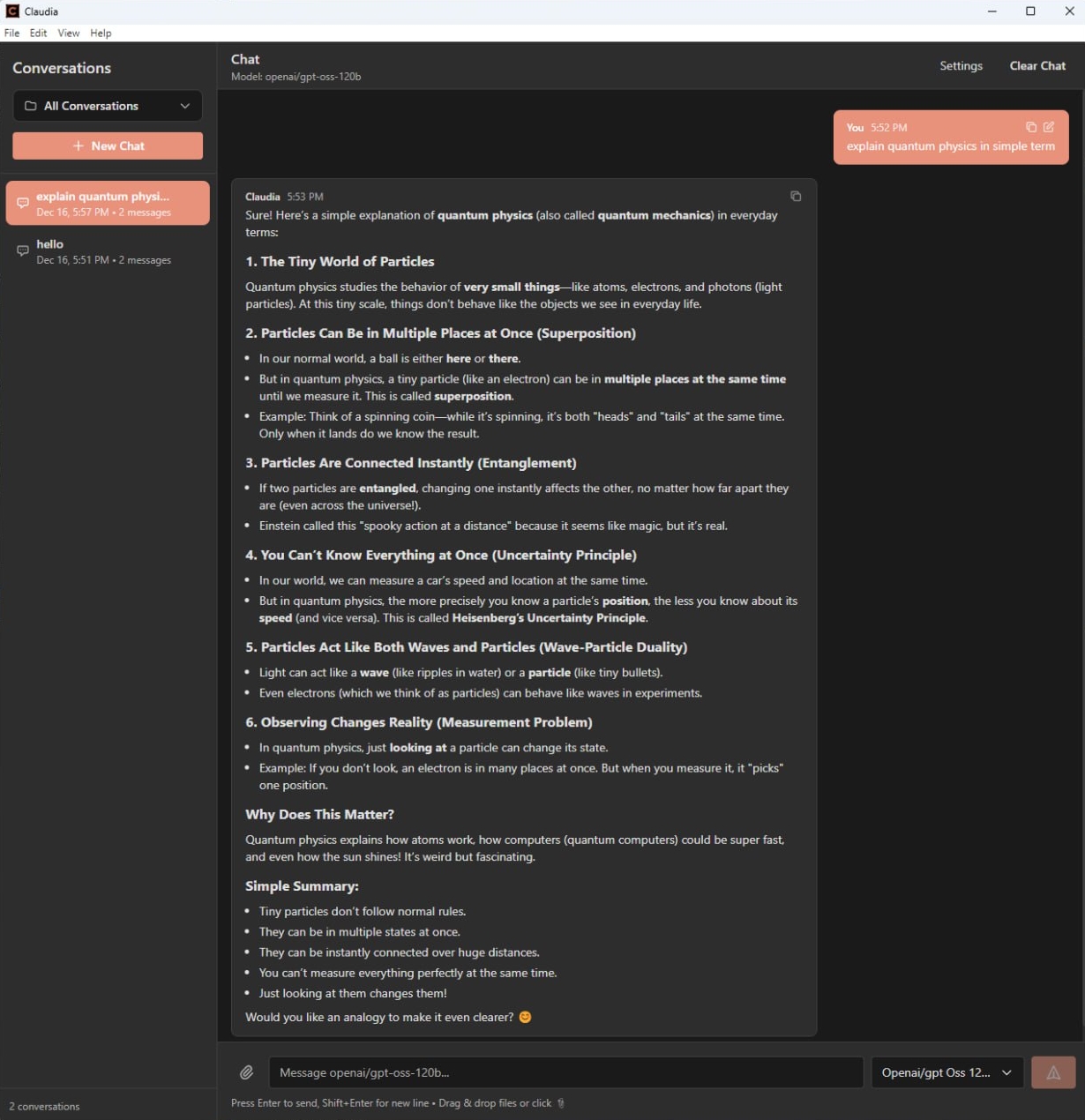
Claudia Desktop in dark and light — Claudia Web shares the same look in the browser
Claudia Desktop
Everything in the Windows app — and much of it powers Claudia Web too
Chat with Streaming
Real-time streaming replies with collapsible reasoning, message statistics, retry and edit of earlier prompts
Branching Conversations
Retry a reply or edit a message to branch the conversation, and switch between versions at any time
Reasoning Effort
Tell Claudia how hard to think from the prompt — "--effort high fix this bug" — or set it for the whole session with /effort
Visual Explanations
The model illustrates its answers with diagrams; SVG, Mermaid and LaTeX render inline as images and math
Skills
Reusable skills you call with /skill in the composer, each with its own instructions and working directory
MCP-UI Interactive Tools
MCP tools can return rich HTML interfaces — buttons, forms, charts — rendered in sandboxed iframes inside the chat
Built-in MCP Servers
File system, Office documents (Word, Excel, PowerPoint, .dotx templates), Diagram Generator and Web Fetch — no config needed
File & Document Attachments
Drag, drop or paste images, PDFs, Word, Excel and PowerPoint files directly into your conversations
@Mention Files & Tools
Reference files from the chat's working folder and tools with @mentions and autocomplete
Context Window Indicator
See how much of the model's context a conversation uses before it runs out
Conversation History
Starred, Today, Yesterday, Previous 7 days — searchable history with auto-generated titles and Ctrl+K search
Profiles
Switch between profiles, each with its own providers, models and settings
Context Menu AI
Select text and choose 'Ask', 'Explain' or 'Copy' to act on it instantly
Plugin System
Extend Claudia with renderer plugins — load, enable, disable and configure extensions
Appearance & Themes
Dark and light mode, custom accent colors, font size, adjustable sidebar and a custom app icon
Automatic Updates
Claudia checks for new releases and updates herself — plus a system tray icon for quick access
MCP Server Management
Custom MCP servers over stdio, SSE and streamable HTTP, with one-click import from Claude Desktop
API Key Security
API keys and credentials are stored encrypted on your machine
Built with Modern Technologies
One shared codebase behind the desktop app and the web server
React 18 + TypeScript
One codebase shared by desktop and web
Electron 28
The Windows desktop app
Node.js 22
The Claudia Web server
PostgreSQL + pgvector
Chats, knowledge and vector search
MCP SDK
Official Model Context Protocol integration
Docker
One-command and air-gapped deployment
Get Started with Claudia
Both editions are free, open source and released together — v0.11.2 is out now
Pick Your Edition
Install Claudia Desktop on Windows, or deploy Claudia Web on your own server with Docker
Connect a Model
Add OpenRouter, Open WebUI, OpenCode Go or any OpenAI-compatible endpoint — Claudia Web also speaks Anthropic and Ollama
Start Chatting
Use MCP tools, attach documents, branch conversations and let Claudia draw diagrams for you
Claudia Desktop
v0.11.2 • Windows 10/11 (x64) • For one person, on your own machine
The installed app updates itself when a new version is released.
Claudia Web
Newv0.11.2 • Docker or Node.js 22 • For your team, on your own server
The air-gap bundle installs on an offline Ubuntu 24.04 server. How to install it →
100% Open Source
MIT Licensed • Community Driven • Contributions Welcome